
| 일 | 월 | 화 | 수 | 목 | 금 | 토 |
|---|---|---|---|---|---|---|
| 1 | ||||||
| 2 | 3 | 4 | 5 | 6 | 7 | 8 |
| 9 | 10 | 11 | 12 | 13 | 14 | 15 |
| 16 | 17 | 18 | 19 | 20 | 21 | 22 |
| 23 | 24 | 25 | 26 | 27 | 28 | 29 |
| 30 | 31 |
- mvc project 생성
- 예외발생
- 자바클래스가 안보일때
- printStackTrace()
- 깃베쉬
- chained exception
- 색상에 따른 상태
- 예외처리
- mark directory as
- POST요청
- 파일을 읽을 수 없을때
- 인텔리제이
- throw e
- 예외 발생
- 사용자 정의 예외
- checked예외
- 빨간폴더
- unchecked예외
- 포트충돌
- 멀티 catch 블럭
- 스프링 mvc프로젝트가 안뜰때
- getMessage()
- exception re-throwing
- 이클립스
- 설치에러
- source root
- arrays메서드
- 빨간파일
- 소스루트설정
- 인텔리제이물음표파일
- Today
- Total
프로그래밍 스티치
이클립스에서 스프링툴 설치시 발생하는 에러해결 본문
An error occurred while collecting items to be installed
session context was:(profile=epp.package.java, phase=org.eclipse.equinox.internal.p2.engine.phases.Collect, operand=, action=).
Unable to read repository at https://download.springsource.com/release/TOOLS/update/3.9.15.RELEASE/e4.17/plugins/org.aspectj.ajde_1.9.6.202012111622.jar.
peer not authenticated
Unable to read repository at https://download.springsource.com/release/TOOLS/update/3.9.15.RELEASE/e4.17/plugins/org.springframework.ide.eclipse.boot.launch.livebean_3.9.15.202012132325-RELEASE.jar.
peer not authenticated
Unable to read repository at https://download.springsource.com/release/TOOLS/update/3.9.15.RELEASE/e4.17/features/org.springframework.ide.eclipse.data.feature_3.9.15.202012132325-RELEASE.jar.
peer not authenticated
이클립스 마켓플레이스에서 설치하는중에 에러가 발생해서 살펴보았습니다. 간단한 해결책으로는
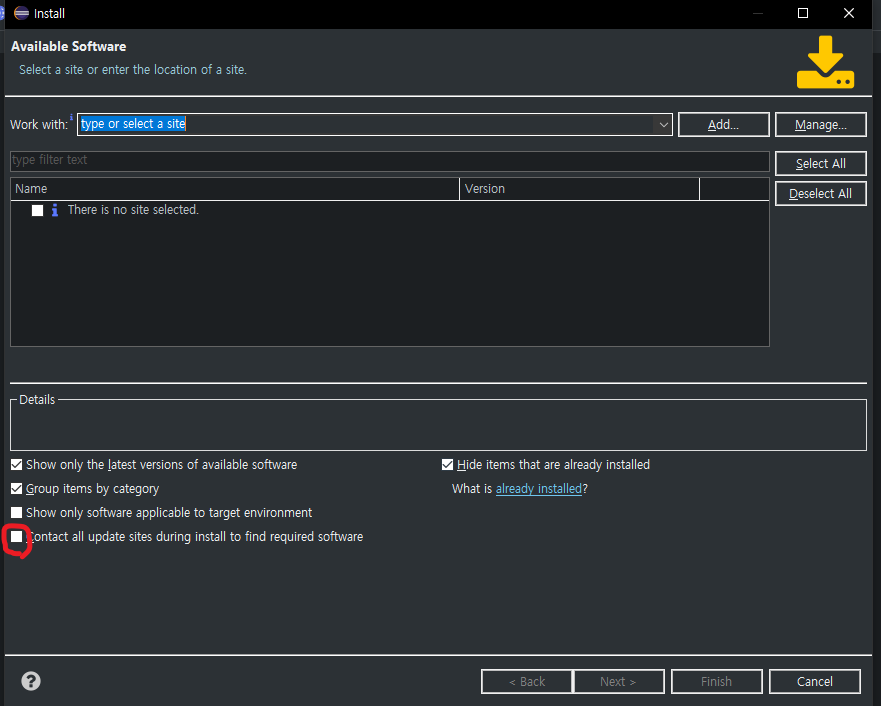
eclipse에서 Help -> Install New Softwarae를 클릭!
Contact all update sites during install to find required software를 체크해제 한뒤에 Cancel을 눌러줍니다.
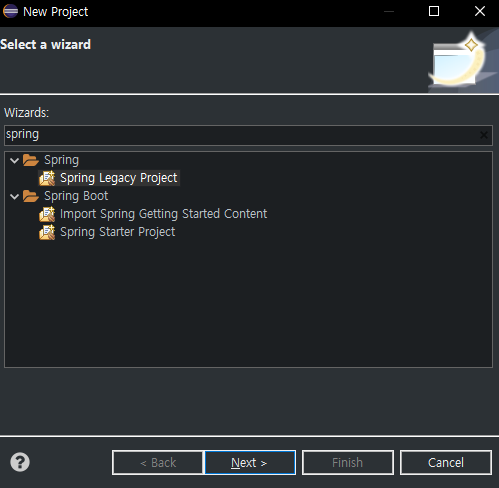
재설치해보면 정상적으로 설치가 완성되는것을 확인할 수 있었습니다.
감사합니다.
'Spring' 카테고리의 다른 글
| 스프링 post요청 하는법 (0) | 2022.07.24 |
|---|
